
Introduction
If you have ever shared a link on Instagram and wondered who actually clicked it, you are in good company. Whether it is the link in your bio, a link sticker in a story, or a URL in a broadcast channel, understanding click behaviour is one of the most direct ways to measure whether your content strategy is working.
The short answer to the question is this: Instagram does not allow you to see the names or identities of specific users who clicked your link. That is a deliberate privacy protection baked into the platform. The longer, more useful answer is that there are several powerful methods to track the total number of clicks, the devices used, the geographic location of your audience, and even the on-site behaviour that follows once someone lands on your website.
This guide covers every method available in 2026, from Instagram's free built-in analytics to Google Analytics 4 UTM tracking and third-party bio link tools, so you can build a complete picture of your link performance.
Key fact: According to Sprinklr and Hootsuite research, 80% of global marketers use Instagram for business in 2025 yet the majority still measure success using vanity metrics like followers and likes rather than link clicks and conversion data. Tracking link clicks moves you from guesswork to evidence.
What Instagram Natively Lets You See
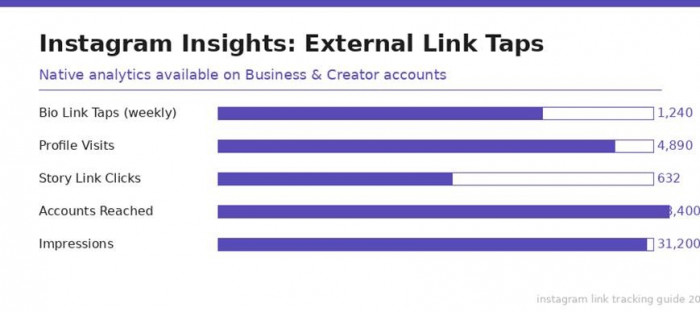
Instagram provides some built-in analytics for Business and Creator accounts through a feature called Instagram Insights. This is your first port of call and costs nothing.
External Link Taps (Bio Link)
Instagram tracks how many times the link in your bio was tapped over any given week. This metric is called External Link Taps. Here is how to access it:
1. Open your Instagram profile and tap the three horizontal lines in the top-right corner.
2. Select Insights from the menu.
3. Tap Accounts Reached and scroll to the bottom of the panel.
4. Look for External Link Taps to see the tap count for the selected period.
5. Use the date filter to compare different time windows.
Story Link Clicks
Since Instagram removed the follower count requirement for story links in 2022, all Business and Creator accounts can add link stickers to their stories. Click data for these is tracked separately:
6. Go to your profile and tap your story archive or active story.
7. Swipe up on any story that contained a link sticker.
8. In the Insights panel, look for Link Clicks to see how many people tapped the link sticker.
9. You can also see this broken down by each story slide for multi-slide stories.
What Instagram Insights Does NOT Show
It is equally important to understand the limitations of native Insights before deciding you need more:
• Instagram will never show you which individual accounts or users clicked your link. This is a permanent privacy constraint.
• Bio link click data is only available in weekly aggregates. You cannot drill down by day or hour in native Insights.
• You cannot see what users did after they clicked your link and left Instagram. Insights stops at the click.
• Personal accounts have zero access to any of these metrics. You must switch to Business or Creator.
• The data window is limited to a maximum of 90 days for most metrics, with some limited to 30 days.
Method 1: UTM Parameters with Google Analytics 4
UTM parameters are tracking codes appended to the end of your website URL. When someone clicks your Instagram bio link and lands on your website, Google Analytics 4 reads those codes and correctly attributes the visit to Instagram as the source.
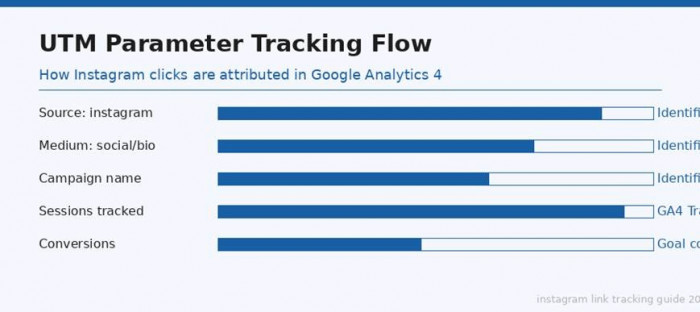
Figure 2: How UTM parameters flow from an Instagram bio click through to Google Analytics 4 attribution
Why UTM Tracking Matters in 2026
Without UTM parameters, Google Analytics 4 often misattributes Instagram traffic. Visits that come through Instagram's in-app browser frequently show up as Direct traffic in GA4, meaning you cannot tell whether visitors came from Instagram, a bookmark, or some other source. UTM tags fix this by explicitly telling GA4 where the visit originated.
According to OWOX BI's 2025 analysis, GA4 now does a substantially better job of identifying Instagram referral traffic than earlier versions of Google Analytics, but some clicks from iOS devices still appear as Direct due to Apple's privacy framework.
How to Build a UTM-Tagged Instagram Link
10. Go to Google's Campaign URL Builder at ga-dev-tools.web.app/campaign-url-builder.
11. Enter your destination website URL in the Website URL field.
12. Set Campaign Source to: instagram (all lowercase).
13. Set Campaign Medium to: social for a general link, or bio for a bio-specific link, or story for a story link.
14. Enter a Campaign Name that describes what you are promoting (example: spring-sale-2026).
15. Copy the generated link and paste it into your Instagram bio or use it inside your Linktree.
16. In GA4, go to Reports, then Acquisition, then Traffic Acquisition. Filter by Organic Social to see your Instagram sessions.
What GA4 Shows You That Instagram Insights Cannot
• Sessions: how many visits came from Instagram over any date range you choose.
• Bounce rate and engagement rate: whether visitors stayed on your site or left immediately.
• Pages visited: which pages people explored after clicking your Instagram link.
• Conversions: whether visitors completed a goal, such as a purchase, sign-up, or form submission.
• Device breakdown: the split between mobile, tablet, and desktop visitors from Instagram.
• Geographic data: the cities and countries your Instagram visitors are coming from.
Important note: UTM parameters only work if your link destination is a website. If your Instagram bio links to another Instagram profile, an app download page, or a WhatsApp link, GA4 cannot track that journey in the same way.
Method 2: Link-in-Bio Tracking Tools
Bio link tools replace your single Instagram bio URL with a mini landing page that can hold multiple links. The significant benefit from a tracking perspective is that each individual link on that page gets its own click counter, device data, and location breakdown.
Top Tools and What They Offer
Linktree
Linktree is the most widely used bio link tool. The free plan gives you views, total clicks, and click-through rate across lifetime, weekly, and monthly windows. Custom date ranges and device or location breakdowns require the Pro plan at around $9 per month.
Beacons
Beacons is a strong alternative that offers more generous data on its free tier, including device breakdown and geographic data without requiring an upgrade. It also supports revenue tracking if you sell products directly through your bio page.
Bitly
Bitly is primarily a URL shortener but doubles as a click tracker. Its free tier shows total clicks, referrer source, and limited location data. The Premium plan unlocks full analytics including device breakdown, custom domains, and campaign grouping.
How to Set Up Linktree for Click Tracking
17. Create a free account at Linktree and add your links in the dashboard.
18. Copy your Linktree URL (it looks like linktr.ee/yourname).
19. Go to your Instagram profile, tap Edit Profile, and replace your current bio link with the Linktree URL.
20. Return to Linktree, go to Analytics in the left-hand menu.
21. Review views, total clicks, click-through rate by link, and (on Pro) device and location data.
Method 3: Advanced Social Analytics Platforms
For brands, agencies, and serious creators who need cross-platform reporting or deeper competitive intelligence, enterprise analytics tools offer the most complete picture of Instagram link performance.
Hootsuite Analytics
Hootsuite Analytics lets you track Instagram alongside Facebook, LinkedIn, TikTok, and Twitter in a single dashboard. For link tracking specifically, Hootsuite offers Ow.ly shortened links that automatically add UTM parameters and report click data inside the Hootsuite dashboard without requiring separate GA4 setup. It also lets you schedule posts and see which post times correlate with the highest link click rates.
Sprout Social
Sprout Social offers similar cross-platform reporting with strong Instagram-specific features including link click data per post, audience growth overlaid with link activity, and custom PDF exports for client reporting. It is particularly popular in agency settings.
Iconosquare
Iconosquare focuses specifically on Instagram and TikTok analytics. Its bio link tracking feature shows how many times the link in your bio was clicked each day, week, and month, with demographic breakdowns and an engagement heatmap that shows when your audience is most active and most likely to click through.
Tracking Method Comparison
The table below summarises all four tracking approaches and what each one can and cannot do for Instagram link tracking.
| Method | What it tracks | Detail level | Identity of clicker? | Cost |
| Instagram Insights | Bio link taps, story link clicks | Basic — weekly totals only | No | Free |
| UTM Parameters + GA4 | Traffic source, device, location, on-site behavior | Very detailed — sessions, conversions, bounce | No | Free |
| Linktree / Beacons / Bitly | Clicks per link, CTR, geography, device | Medium to detailed (depends on plan) | No | Free + Paid |
| Hootsuite / Sprout Social | Multi-channel, custom reports, competitor data | Advanced — cross-platform analytics | No | Paid only |
Link Tracking Tool Feature Breakdown
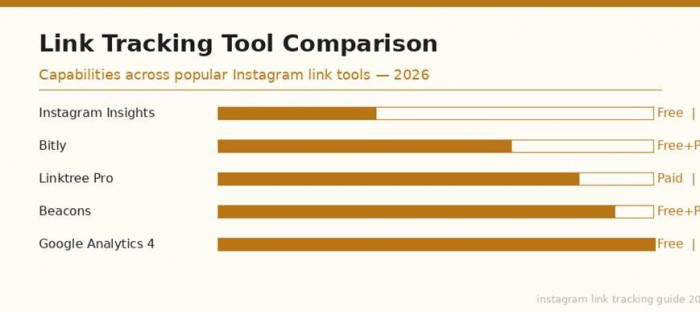
The following table compares feature availability across the most commonly used Instagram link tracking tools as of 2026. Free tiers are noted separately from paid upgrades where applicable.
| Tool | Free Clicks Data | Device Split | Location | Custom UTM | Multi-link | Price |
| Instagram Insights | Weekly tap total | No | No | No | No | Free |
| Linktree Free | Views, clicks, CTR | No (paid) | No (paid) | No (paid) | Yes | Free |
| Linktree Pro | Full analytics | Yes | Yes | Yes | Yes | $9/mo |
| Beacons | Clicks + revenue | Yes | Yes | Yes | Yes | Free/Paid |
| Bitly Free | Click count + referrer | Yes (limited) | Yes (limited) | Yes | No | Free |
| Bitly Premium | Full analytics | Yes | Yes | Yes | Yes | $35/mo |
| Google Analytics 4 | Sessions, goals, funnels | Yes | Yes | Yes (source) | N/A | Free |
Instagram Link Click Benchmarks for 2025 and 2026
Understanding whether your click numbers are strong or weak requires context. The benchmarks below are based on aggregated industry data reported by AdBacklog, Sprinklr, Iconosquare, and Hootsuite across 2025. These figures represent bio link and story link click-through rates by account size.
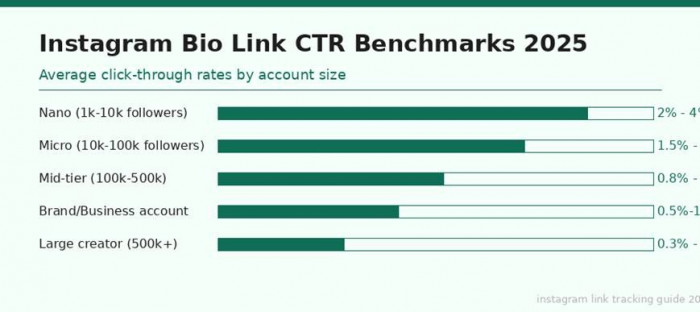
Figure 4: Average Instagram bio link CTR benchmarks by account tier — 2025 industry data
| Account type | Bio Link CTR | Story Link CTR | Avg. weekly taps | Notes |
| Nano (1k–10k followers) | 2% – 4% | 3% – 6% | 20–400 | High trust, very niche. Audiences click more. |
| Micro (10k–100k followers) | 1.5% – 3% | 2% – 5% | 150–3,000 | Strong community. Good for conversions. |
| Mid-tier (100k–500k) | 0.8% – 2% | 1.5% – 3% | 800–10,000 | Wider reach but CTR dilutes at scale. |
| Brand/Business account | 0.5% – 1.5% | 1% – 2.5% | Varies by reach | Strong CTA copy makes a big difference. |
| Large creator (500k+) | 0.3% – 1% | 0.8% – 2% | 1,500–50,000+ | Volume high; % lower than smaller creators. |
Table 3: Instagram link CTR benchmarks by account size — sourced from Sprinklr, Hootsuite, Iconosquare, and AdBacklog (2025)
Research insight: According to AdBacklog's 2025 Instagram Ads benchmarks, travel and entertainment accounts see some of the lowest cost-per-click rates on the platform (often under $0.50) while Legal and Real Estate sectors pay the highest CPMs for feed placements. For organic (non-paid) bio links, smaller niche accounts consistently outperform large accounts on a percentage basis, even if raw volume is lower.
New in 2026: What Has Changed for Instagram Link Tracking
Instagram's analytics features have continued to evolve. Here are the most important updates that affect how you track link clicks in 2026.
Individual Post Link Attribution
Instagram now shows, on each individual post's Insights panel, how many external link taps that specific post generated. Previously, bio link tap data was only available at the account level for the full week. This post-level data makes it possible to directly compare which caption styles, content formats, or call-to-action phrases drove the most link clicks without running separate experiments.
Broadcast Channel Link Tracking
Instagram Broadcast Channels, rolled out globally in 2023 and expanded with new analytics features through 2024 and 2025, now include link tap data at the message level. If you share a link inside a broadcast message, you can see how many channel members tapped it, though individual identities remain private as always.
Improved GA4 Instagram Attribution
Google Analytics 4 has improved its handling of Instagram referral traffic significantly since mid-2024. Visits coming through Instagram's in-app browser are more reliably tagged as coming from Instagram rather than falling into the Direct bucket. However, traffic from iOS users who have disabled tracking via Apple's App Tracking Transparency framework may still appear as Direct, so total Instagram traffic figures in GA4 remain slightly understated compared to reality.
Meta Business Suite Consolidated View
Meta Business Suite now offers a consolidated link performance view that brings together data from your Facebook Page, Instagram profile, and any Meta-hosted product catalogue. For businesses running both organic Instagram content and Meta ads with website links, this gives a single-screen overview of all Meta-driven web traffic without needing to cross-reference separate tools.
• Reels now show external link tap data per Reel in the Insights panel for Business accounts.
• Instagram Collab posts now attribute link taps to both collaborating accounts simultaneously, with each seeing their share in their own Insights.
• Story link stickers can now be tracked inside Meta Business Suite with daily granularity rather than weekly only.
Best Practices for Getting More From Your Instagram Link
Use a Strong, Specific Call to Action
The phrase you use in your caption or story to direct people to your link has a direct impact on click-through rate. Specific instructions outperform generic ones. Rather than saying 'link in bio', say 'tap the link in my bio to grab the free download' or 'swipe up to book your spot before it fills'. The clearer and more specific the benefit, the more clicks you will see.
Match Your Link to Your Current Content
One of the most common reasons bio links underperform is a mismatch between what the post is about and where the link goes. If your latest Reel is about a recipe, make sure your bio link goes to that recipe page, not your general homepage. Audiences expect continuity. Every time you publish content that references a specific link, update your bio link or use a Linktree page where the relevant link sits prominently at the top.
Rotate Your Link Stickers in Stories
Stories with a link sticker perform better when the sticker is placed where it feels natural within the visual design rather than always centered. Testing different positions, sizes, and sticker text (you can customise the text on a story link sticker) across different stories will help you identify what drives the highest tap rate for your specific audience.
Review Your Data on a Weekly Basis
A weekly review of your Instagram Insights alongside your GA4 traffic acquisition report gives you enough data to identify patterns without being overwhelmed by daily noise. Look for which posts correlated with spikes in bio link taps, what content types drove the most story link clicks, and whether your GA4 sessions from Instagram are trending up or down over the past four weeks.
Combine All Three Methods
Using Instagram Insights for a quick daily or weekly pulse, a bio link tool like Beacons or Linktree for per-link breakdowns, and GA4 for on-site behaviour together gives you the most complete view possible. Each layer answers a different question. Insights tells you how many clicks happened. Linktree tells you which specific link they went to. GA4 tells you what they did once they arrived.
• Always keep your bio link updated to match your most recent and most promoted content.
• Add UTM parameters to every link before it goes into your bio, even if you also use a bio link tool.
• Check GA4 for session quality, not just volume. A thousand clicks that bounce immediately are worth less than 200 clicks with a 4-minute average engagement time.
• Use the post-level link tap data (available as of 2025) to A/B test different call-to-action styles across comparable posts.
Conclusion
No tool, paid or free, will ever tell you the exact name of the person who clicked your Instagram link. Instagram's privacy architecture makes that impossible by design. What you can build, however, is a genuinely detailed picture of your audience's behaviour that goes well beyond a raw click count.
You can know how many people clicked, when they clicked, what device they were using, where in the world they were, which of your posts drove them to click, and what they did after they landed on your website. That combination of information, stitched together from Instagram Insights, Google Analytics 4, and a bio link tool, is more actionable than a list of names would ever be.
Start with a Business or Creator account on Instagram. Set up a UTM-tagged link using Google's URL Builder. Pick one bio link tool such as Beacons or Linktree and replace your single bio URL with it. Review your data weekly. That three-step foundation, free to implement, will put you far ahead of most creators and businesses when it comes to understanding what your Instagram link is actually doing for you.
Final research note: Hootsuite's 2025 Instagram benchmarks confirm that engagement with bio links is consistently highest in the 24 hours immediately following a post. Posting with a clear link-in-bio call to action and then checking your link tap data the following morning is one of the fastest feedback loops available to content creators.
Comments